Java
Bus Ticketing System in Java Assignment
· Eric B.
A bus ticketing system in Java is a console program that seats riders on one bus, bills each paying rider, and keeps a ban list that survives between runs. The version in this walkthrough runs on 4 classes and 891 lines of plain Java. No database. No framework. Three .dat files and a Scanner.
I worked from the same one-page flow spec students get handed: a startup sequence, a dashboard, an add path, a remove path, and a close sequence. Under that, a class list with fields and method signatures written in near-English. That spec is the whole assignment. Turning it into compiling Java is the graded part.
This walkthrough covers the design decisions behind each class, the exact console output the program produces, and three defects sitting in the shipped code. One of them silently deletes every rider, invoice, and ban you saved. If your version already does that, jump to the save section.
If translating a spec sheet into classes is the part that stalls you, How to Break Down a Programming Assignment covers that step on its own.
What the Bus Ticketing System Does
The program manages a single bus with one driver, a fixed seat count, and a rider list that changes during a shift. Everything happens through a 9-option text menu that loops until you exit.
| # | Menu option | What it does |
|---|---|---|
| 1 | View Dashboard | Prints the seat grid, occupancy count, and current rider list |
| 2 | Add Rider | Creates a rider, checks the ban set, assigns a seat, records payment |
| 3 | Remove Rider | Removes a rider, optionally bans them, optionally sends their invoice |
| 4 | Manage Banned Riders | Views, adds, and removes entries in the ban set |
| 5 | View All Invoices | Prints every invoice as a table with total revenue |
| 6 | View Daily Report | Filters invoices to today and sums the revenue |
| 7 | Update Bus Profile | Changes driver name, maximum occupancy, and seats per row |
| 8 | Save Data | Writes all three .dat files |
| 9 | Exit | Saves, then ends the loop |
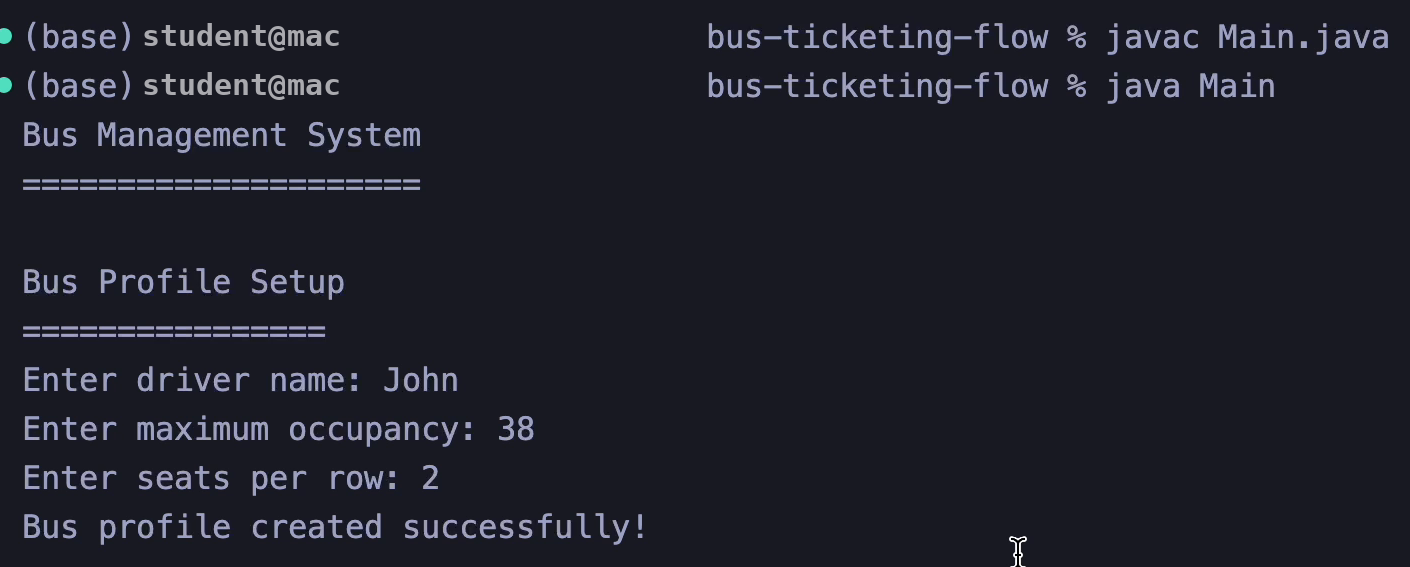
On startup the program checks for profile.dat, invoices.dat, and banned.dat. All three present means a load. Anything missing means first-run setup, which asks for driver name, maximum occupancy, and seats per row.
The sample data supplied with this build reads John,38,2. Driver John, 38 seats, 2 seats per row, which prints as a 19-row grid.
The Spec, Translated Into 4 Java Classes
The spec names 3 classes. The build adds Main as a fourth for the menu loop and file access, which keeps input handling out of the domain objects.
| Class | State it holds | Job | Persists to |
|---|---|---|---|
Main | One Scanner, one BusProfile | Menu loop, input parsing, file read and write | Nothing |
BusProfile | Driver name, max occupancy, seats per row, current occupancy, 3 collections | Seating rules, reports, ban checks | profile.dat |
Rider | Name, description, seat, invoice | Rider identity and ban matching | banned.dat |
Invoice | Name, date, amount paid, driver name | Billing record | invoices.dat |
That split follows the spec line for line. BusProfile owns the collections. Rider and Invoice stay as data carriers with behavior attached to their own fields. Neither extends the other, because a rider and an invoice share nothing structurally. Inheritance vs Composition: OOP Tradeoffs walks through why a has-a relationship fits here and an is-a relationship does not.
Why BusProfile Holds Static Fields
The spec asks for Static String Driver Name and Static int Maximum Occupancy, so the build declares them static:
public class BusProfile {
    private static String driverName;
    private static int maximumOccupancy;
    private static int seatsPerRow;
    private List<Invoice> allInvoices;
    private Set<Rider> bannedRiders;
    private List<Rider> currentRiders;
    private int currentOccupancy;
A static field belongs to the class, not to any single object. Every BusProfile instance in the JVM reads and writes the same driverName. For one bus that behaves fine, and it lets Rider call BusProfile.getMaximumOccupancy() without holding a reference to the profile.
The cost arrives the moment a second bus enters the picture. Two BusProfile objects share one driver name and one seat count, and the second constructor overwrites the first. Static state also blocks unit testing, since values leak between test methods.
Write the trade-off into your report. Graders reward a student who implements the spec and names its limits. SOLID Principles of Object-Oriented Design gives you the vocabulary for that paragraph.
Why Banned Riders Use a Set and Current Riders Use a List
The spec assigns Set Riders Banned Riders and List Riders Current Riders, and the reason is duplicate handling.
A HashSet rejects a second entry that equals one already inside. Banning the same rider twice leaves one record, which is the correct outcome. A List keeps insertion order and accepts duplicates, which matters for the rider roster because the dashboard iterates it in a stable order and the remove menu numbers riders from that iteration.
There is a catch. HashSet iteration order carries no guarantee, so the ban menu numbers entries in an order Java picks. Selecting entry 2 twice across separate menu visits stays reliable in practice, and stops being reliable the moment the set resizes. Sorting the copy before display removes the risk in one line. Java Collections Framework Explained covers the ordering guarantees for each collection type.
Rider: equals and hashCode Decide Who Gets Banned
Rider overrides equals and hashCode so that two rider objects with the same name count as the same person, ignoring letter case.
@Override
public boolean equals(Object o) {
    if (this == o) return true;
    if (o == null || getClass() != o.getClass()) return false;
    Rider rider = (Rider) o;
    return name.equalsIgnoreCase(rider.name);
}

@Override
public int hashCode() {
    return Objects.hash(name.toLowerCase());
}
Skip hashCode and the HashSet breaks quietly. Java falls back to the identity hash, so new Rider("Bob", "...") and a Bob loaded from banned.dat land in different buckets. bannedRiders.add() then stores both, and the ban list grows a duplicate every time the driver bans Bob again.
Both overrides use the same field, name, which satisfies the contract: objects that are equal produce equal hash codes. Lowercasing inside hashCode matches the equalsIgnoreCase in equals. Mixing them, for example hashing on the raw name while comparing case-insensitively, produces the classic bug where bob and Bob are equal yet hash apart.
The ban check itself takes a different route:
public boolean isBannedRider(Rider rider) {
    for (Rider bannedRider : bannedRiders) {
        if (bannedRider.compare(rider)) {
            return true;
        }
    }
    return false;
}
That is a linear scan calling compare(), not a hash lookup. It runs in O(n) instead of O(1) and works even with broken hashCode, which is exactly why a broken hashCode here goes unnoticed until the ban list starts showing duplicates. Swapping the loop for bannedRiders.contains(rider) gives you constant-time lookup and exercises the overrides you already wrote.
One more thing worth knowing about Rider. The two-argument constructor generates a random seat:
private int generateSeatNumber() {
    return (int) (Math.random() * BusProfile.getMaximumOccupancy()) + 1;
}
Main then prompts for a seat and calls setSeat(), discarding the random value entirely. The generator is dead code. Say so in your comments rather than leaving a grader to find it.
Invoice: One Object, Three Jobs
Invoice creates a billing record, rebuilds itself from a saved line, and prints itself to a destination. Four fields: name, date, amount paid, driver name.
public Invoice(String name, double amountPaid, String driverName) {
    this.name = name;
    this.date = new Date();
    this.amountPaid = amountPaid;
    this.driverName = driverName;
}
The date stamps itself at construction, matching the spec line Generates and sets Date. The string constructor reverses toString() using a fixed pattern:
SimpleDateFormat dateFormat = new SimpleDateFormat("yyyy-MM-dd HH:mm:ss");
this.date = dateFormat.parse(parts[1]);
A saved invoice from the sample data looks like this:
Bob,2025-06-13 07:58:45,200.0,JohnTwo flaws hide in that constructor. The catch (ParseException e) block falls back to the current date, but by then amountPaid and driverName never got assigned, leaving 0.0 and null. Revenue totals then read $0.00 for that rider with no error printed. Second, a short or malformed line throws ArrayIndexOutOfBoundsException, which the catch block ignores because it only catches ParseException.
Two edits close both holes. Assign name, amountPaid, and driverName before the parse runs, so a bad date leaves the money intact. Then check parts.length at the top of the constructor and reject a short line outright.
Catching the specific exception and failing loudly on bad input is the pattern graders look for. Exception Handling in Java: Full Guide covers checked against unchecked exceptions and where each belongs.
The send() method prints to the console with a comment marking the spot for real email or SMS:
public boolean send(String destination) {
    System.out.println("Sending invoice to " + destination + ":\n" + this);
    return true;
}
That stub satisfies the spec line Send (place to send). Leave the comment in. It shows the grader you understood the boundary between assignment scope and production scope.
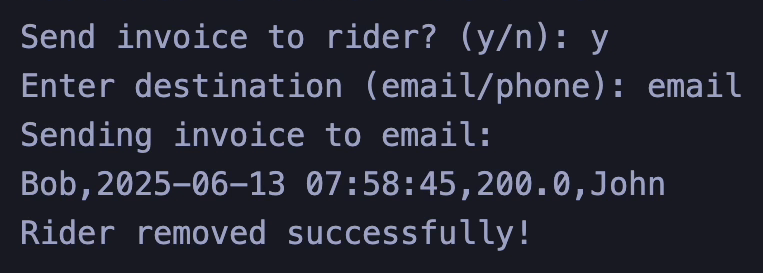
The console output shows exactly what the invoice serializes to: Bob,2025-06-13 07:58:45,200.0,John. Four fields, three commas. Hold that line in mind for the round-trip defect two sections down.
BusProfile: Occupancy Rules and the Daily Report
BusProfile enforces two invariants: occupancy never exceeds the maximum, and occupancy never drops below zero.
public boolean addRider(Rider rider) {
    if (currentOccupancy < maximumOccupancy) {
        currentRiders.add(rider);
        currentOccupancy++;
        return true;
    }
    return false;
}
Both methods return a boolean instead of throwing, which matches the spec lines Returns if added and Returns if a rider is removed. Main checks capacity a second time before prompting for a name, so a full bus rejects the rider early with a clear message. Duplicated rule, better user experience. Worth a sentence in your report.
The daily report filters the full invoice list down to today using a stream:
public String getDailyReport() {
    Date today = new Date();
    List<Invoice> todayInvoices = allInvoices.stream()
        .filter(invoice -> isSameDay(invoice.getDate(), today))
        .collect(Collectors.toList());

    double totalRevenue = todayInvoices.stream()
        .mapToDouble(Invoice::getAmountPaid)
        .sum();
isSameDay compares year, month, and day through Calendar rather than comparing Date objects directly. A direct comparison fails because Date carries milliseconds, so two invoices from the same afternoon never match.
java.time.LocalDate replaces all of that with invoice.getDate().equals(today) once you migrate off Date. Java 8 introduced it in 2014, and Calendar has been soft-deprecated ever since. Keep Date if the spec names it, and mention LocalDate as the modern route.
Both getters return copies rather than the live collections:
public List<Rider> getCurrentRiders() {
    return new ArrayList<>(currentRiders);
}
That defensive copy stops outside code from adding a rider without incrementing currentOccupancy. It also means anything you remove from the returned list disappears into nothing. removeBannedRider() in Main works around this by calling setBannedRiders() afterward. Consistent, and easy to get wrong in the next method you add.
The Dashboard: Printing a Seat Grid With printf
The dashboard prints every seat as a fixed-width cell and starts a new row using modulo arithmetic.
for (int i = 0; i < maxOccupancy; i++) {
    if (i > 0 && i % seatsPerRow == 0) {
        System.out.println();
    }
    int seatNumber = i + 1;
    ...
    System.out.printf("[%2d:%-10s] ", seatNumber, "Empty");
}
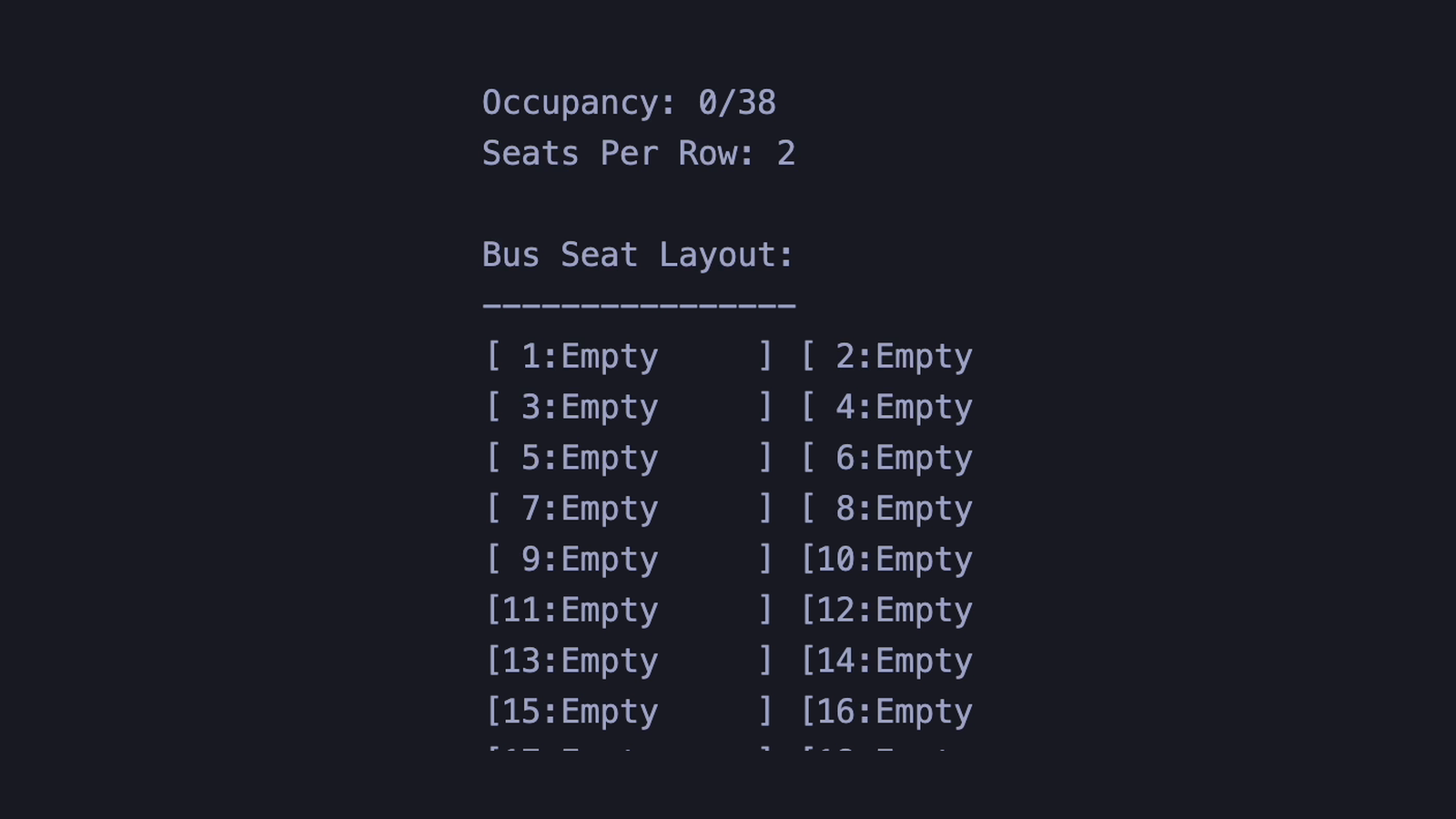
i % seatsPerRow == 0 fires at index 2, 4, 6 and onward when seatsPerRow is 2. The i > 0 guard stops a blank line before seat 1. With 38 seats at 2 per row you get 19 rows, exactly as the recording shows.
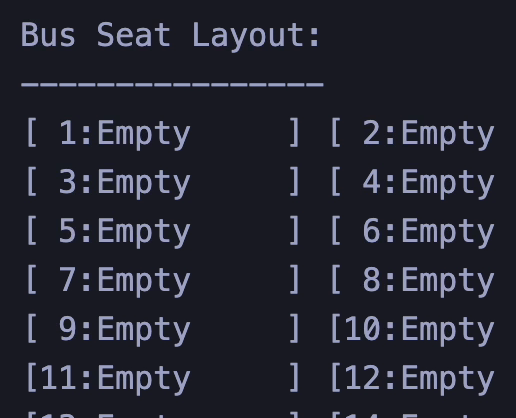
The format string does the alignment work. %2d right-aligns the seat number in 2 characters, so seat 7 and seat 38 keep their brackets in line. %-10s left-aligns the occupant name inside 10 characters, padding short names with spaces.
Long names get truncated before they reach the format string:
occupantName.length() > 10 ? occupantName.substring(0, 7) + "..." : occupantNameEleven characters or more becomes 7 characters plus an ellipsis, landing at exactly 10. Column alignment holds for any name length. Small detail, and it separates a grid that reads cleanly from one that jitters.
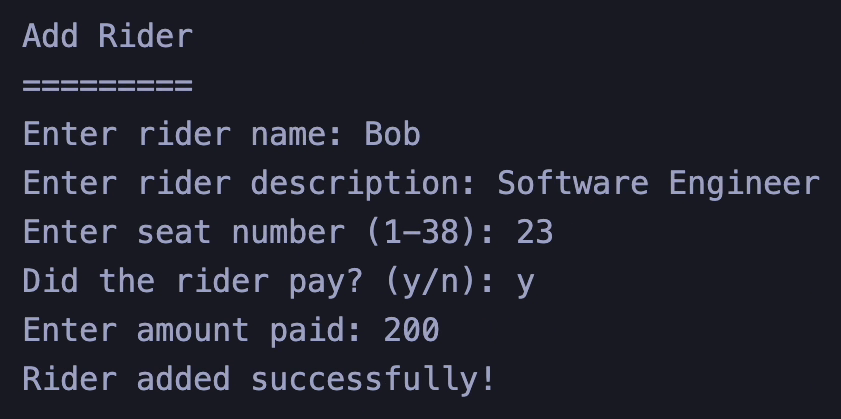
Saving and Loading Without a Database
Persistence runs through three plain text files written to the working directory: profile.dat for the bus setup, invoices.dat for the billing history, and banned.dat for the ban set.
Reading uses NIO, writing uses a FileWriter in try-with-resources:
private static String readFile(String filename) throws IOException {
    return new String(Files.readAllBytes(Paths.get(filename)));
}

private static void writeFile(String filename, String content) throws IOException {
    try (FileWriter writer = new FileWriter(filename)) {
        writer.write(content);
    }
}
Try-with-resources closes the writer even when the write throws. Java File I/O: Read, Write, and Manage Files covers the stream and reader options, path handling, and existence checks in depth.
Current riders never get saved, and the spec never asks for it. Riders belong to a shift, not to the bus. Say that in your report before a grader flags it as an omission.
Base64 Is Encoding, Not Encryption
The spec asks for Private Encrypt (String) and the build supplies Base64:
private String encrypt(String data) {
    return Base64.getEncoder().encodeToString(data.getBytes());
}
Base64 is a reversible transport encoding with no key. Anyone with a browser console decodes it in one call. The code comment says as much, and the comment is the right instinct.
For an assignment, Base64 satisfies the requirement. For anything past that, javax.crypto.Cipher with AES and a SecretKeySpec gives you real encryption in about 15 lines. Naming the difference in your submission earns more credit than the encoding does.
The Save Bug That Erases Your Data
Here is the defect. Main.saveBusProfile() writes plain text:
String profileData = BusProfile.getDriverName() + "," +
                     BusProfile.getMaximumOccupancy() + "," +
                     BusProfile.getSeatsPerRow();
writeFile(PROFILE_FILE, profileData);
The loading constructor decodes:
public BusProfile(List<String> files) {
    String profileData = decrypt(files.get(0));
decrypt calls Base64.getDecoder().decode(). A comma sits outside the Base64 alphabet, so decoding John,38,2 throws IllegalArgumentException on the spot. loadBusProfile() catches every exception and drops you into first-run setup:
} catch (Exception e) {
    System.out.println("Error loading bus profile: " + e.getMessage());
    setupBusProfile();
}
Every saved invoice and every ban disappears. The program looks brand new. The files still sit on disk holding data the program refuses to read.
The root cause is duplication. BusProfile.save() exists, encrypts correctly, and never writes to disk, because a comment inside it says a real implementation writes files. Main then implements its own save without the encryption step. Two save paths, one of them wrong, and the wrong one runs.
The fix routes all 3 writes through encrypt before the string reaches writeFile. Change encrypt from private to package-private so Main reaches it, then delete the unused save() method so one save path remains. Test it by adding a rider with payment, exiting, and relaunching. The invoice reappears or the bug is still live.
Commas Inside toString Break the Round Trip
The second defect hits any rider who paid. Rider.toString() builds a comma-separated line and embeds the invoice inside it:
return name + "," + description + "," + seat + "," +
       (invoice != null ? invoice.toString() : "null");
Invoice.toString() contributes 3 more commas of its own, visible in the invoices.dat line above. A banned rider carrying an invoice therefore serializes to 7 comma-separated fields, not the 4 the parser expects.
Then Rider(String data) runs data.split(",") and reads parts[3] as the entire invoice. It receives the invoice name alone, because the split already cut the invoice into pieces. That single token reaches the Invoice string constructor, and parts[1] throws ArrayIndexOutOfBoundsException.
The one-line fix caps the split. Pass 4 as the limit argument to split, so it stops after 3 delimiters and parts[3] holds the full invoice string intact. That works until a rider description contains a comma, and Software Engineer, Level 2 breaks it again.
The durable fix changes the delimiter to a character your data lacks. Join the 4 fields with a pipe inside toString(), then split on an escaped pipe using the same limit of 4. split takes a regex, so the pipe needs a double backslash in front of it. Reject pipes at the input prompt and the format holds. Java File I/O: Read, Write, and Manage Files covers serialization approaches that sidestep delimiter problems entirely.
Input Validation That Survives a Typo
Main wraps every numeric prompt in a loop that re-asks instead of crashing.
private static int getIntInput(String prompt) {
    while (true) {
        try {
            System.out.print(prompt);
            return Integer.parseInt(scanner.nextLine().trim());
        } catch (NumberFormatException e) {
            System.out.println("Please enter a valid number.");
        }
    }
}
An overload adds range checking and reuses the first method:
private static int getIntInput(String prompt, int min, int max) {
    while (true) {
        int value = getIntInput(prompt);
        if (value >= min && value <= max) {
            return value;
        }
        System.out.printf("Please enter a number between %d and %d.\n", min, max);
    }
}
The seat prompt calls it as getIntInput("Enter seat number (1-" + maxOccupancy + "): ", 1, maxOccupancy). Out-of-range input loops without touching the rider list.
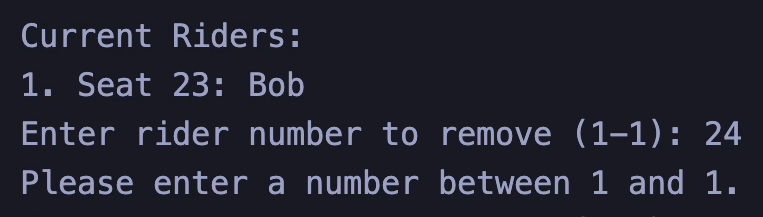
The remove prompt behaves the same way. Typing 24 when 1 rider is seated returns the message and re-asks, and no rider leaves the bus in between.
Notice the whole file uses scanner.nextLine() and parses the string, never scanner.nextInt(). That choice avoids the most common Scanner bug in Java coursework: nextInt() consumes the number and leaves the newline in the buffer, so the next nextLine() returns an empty string and the following prompt appears to skip itself. Reading full lines every time removes the trap.
A grader typing abc at the menu prompt is a standard input test. Why Code Fails on Submission and How to Fix It covers the input cases automated graders throw at console programs, and How to Pass Hidden Test Cases covers the edge inputs that stay out of the assignment sheet.
6 Bugs Graders Look For in This Homework
| # | Symptom | Cause | Fix |
|---|---|---|---|
| 1 | Saved data vanishes on relaunch | Main writes plaintext, constructor Base64-decodes | Route all writes through encrypt, delete the unused save() |
| 2 | Banned rider with an invoice fails to load | Rider.toString() embeds 3 extra commas | Cap the split at 4 fields as a quick fix, pipe delimiter as the durable one |
| 3 | Revenue shows $0.00 for a rider | ParseException catch leaves amountPaid unassigned | Assign fields before parsing, validate parts.length |
| 4 | Same person banned twice | Ban check scans linearly, duplicates slip in through add() | Use bannedRiders.contains(rider) and rely on equals |
| 5 | Ban menu numbering shifts | HashSet iteration order carries no guarantee | Sort the display copy by name before printing |
| 6 | Seat assigned randomly then overwritten | generateSeatNumber() runs, setSeat() discards it | Remove the generator or move seat selection into BusProfile |
Fix 1 and 2 before submission. Both destroy data, and data loss reads worse on a rubric than a missing feature. 5 Grading Rubric Traps Costing Students Marks covers the deductions students hit after the code already compiles.
How to Compile and Run It
Four .java files in one folder compile from the entry point. No build tool, no classpath flags. The recording runs these 2 commands:
javac Main.java
java Main
javac follows the references out of Main and produces Main.class, BusProfile.class, Rider.class, and Invoice.class beside the sources. java Main starts the menu loop. The Main argument takes the class name, not the file name, so java Main.java fails on older JDKs and java Main.class fails on all of them.
The three .dat files land in whatever directory you launched from, because Paths.get("profile.dat") resolves against the working directory. Launch from a different folder and the program treats it as a first run. Inside VS Code the working directory defaults to the workspace root, which sits above your source folder on some setups.
Reset to a clean state by deleting all 3 .dat files from that working directory. The next launch finds nothing and runs first-run setup again.
Compilation errors before any of this usually trace to one missing brace or semicolon, and javac reports a line number well past the real cause. Syntax Errors: Common Examples and Fixes covers reading those messages backward to the actual line.
5 Extensions That Take This Assignment Past the Rubric
Five additions convert a passing submission into a portfolio piece, ordered by effort.
- Real encryption. Replace Base64 with AES through
javax.crypto.Cipherand aSecretKeySpec. Around 15 lines, and it turns a spec checkbox into a security discussion. - Seat rules inside BusProfile. Move the taken-seat check out of
Mainand intoaddRider(Rider, int seat). Domain rules belong with domain state, and the class becomes testable in isolation. - Migration to java.time. Swap
DateandCalendarforLocalDateTimeandDateTimeFormatter. TheisSameDayhelper collapses intotoLocalDate().equals(...). - JUnit tests. Cover the occupancy invariants, the ban set equality contract, and a save-then-load round trip. That third test catches the data loss bug automatically.
- A Swing dashboard. Render the seat grid as a button grid where each button opens the rider it holds. Java Swing Tutorial for Beginners covers the layout managers that handle a 19-row grid.
Extension 2 opens the door to a strategy or factory pattern for seat allocation, which Software Design Patterns Explained walks through with Java examples. Before any of it, run a naming and formatting pass using the checklist in SOLID, DRY, KISS, YAGNI: Design Principles, because readability marks are the cheapest ones on the sheet.
Frequently Asked Questions
What is a bus ticketing system in Java?
A bus ticketing system in Java is a console program that seats riders on a bus, records payments as invoices, and maintains a ban list. This build runs on 4 classes with file-based storage and no database.
Which classes does a bus ticketing system assignment require?
Three domain classes cover the spec: BusProfile for bus state and collections, Rider for passenger identity, and Invoice for billing records. A fourth class, Main, holds the menu loop and file access.
Why does my saved bus data disappear after restarting?
Saved data disappears when the save path writes plain text and the load path Base64-decodes it. Decoding a comma throws IllegalArgumentException, the catch block runs first-run setup, and the files stay unread.
Do I need a database for a bus ticketing system in Java?
No database is required. Three text files handle storage: one for the bus profile, one for invoices, one for banned riders. Files.readAllBytes and FileWriter cover both directions.
Why does the banned rider list use a Set instead of a List?
A Set rejects duplicate entries, so banning the same rider twice stores one record. That behavior depends on Rider overriding both equals and hashCode using the same field.
How do I print a bus seat grid in the console?
Loop from 0 to the seat count and print a newline when the index divides evenly by seats per row. Format each cell with printf using %2d for the seat number and %-10s for the occupant.
Getting Unstuck
A bus ticketing system exercises 6 skills at once: class design, collections, file I/O, string parsing, exception handling, and formatted console output. Any one of them going sideways stalls the whole build, which is why this assignment eats a weekend more often than the page count suggests.
Working through the defects above solves most of it. For the parts that stay stuck, our Java Assignment Help service pairs you with the expert who does the work, and you talk to them before any payment. Every delivery includes a step-by-step explanation document, because a working file with no explanation behind it helps nobody in a viva.
Prefer to build it yourself with someone watching? Java Tutor Online runs 1:1 sessions on your own code. You can also browse Programming Homework Samples to see the format of what gets delivered, or start at Do My Programming Homework for anything outside Java.
Related articles
-
 Java
JavaJava Collections Framework Explained
A practical Java Collections guide: List, Set, Queue, Map, Comparable, the Collections utility class, time complexity, and the Stream API.
Sep 4, 2023
-
 Java
JavaSpring Batch: A Practical Guide to Restartable Jobs
Learn Spring Batch 6 through a restartable CSV-to-database job covering jobs, steps, chunks, metadata, fault tolerance, parameters, testing, and scaling.
Sep 23, 2026
-
 Java
JavaJava Swing Tutorial for Beginners
Learn Java Swing from scratch: build your first window, wire button events, master five layout managers, and assemble a working calculator GUI.
May 24, 2024