Programming
Graph Traversal Algorithms: Java and Python

Depth First Search Algorithm
Depth First Search (DFS) is a traversal algorithm used to search or iterate through every node of a tree or graph. It prioritizes depth over breadth: the algorithm visits a node, then recurses into its children before backtracking to siblings. Nodes already visited are skipped.
DFS Walkthrough with Diagram
Consider this tree:
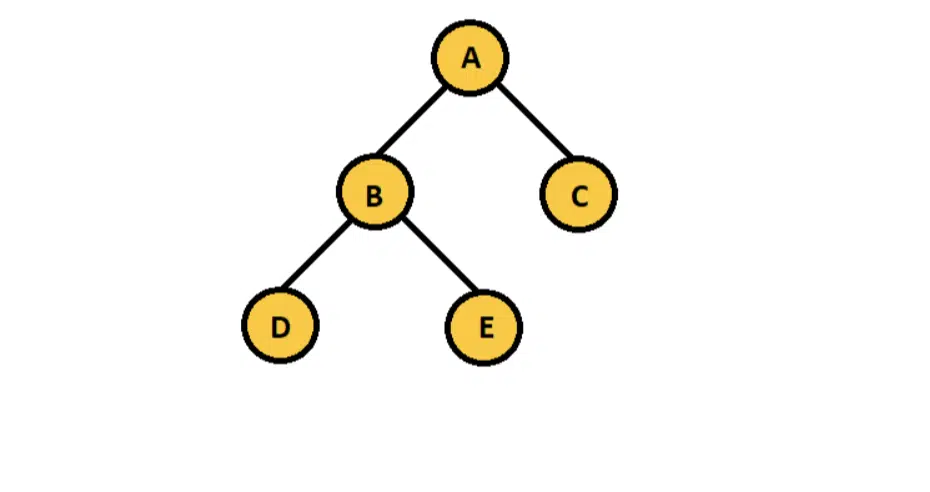
DFS starts at node A, then descends into B (the first child). Rather than moving to C (A’s second child), it goes deeper into D (B’s first child). D has no children, so the algorithm backtracks to B and visits E. After E it backtracks to B, then to A, then visits C. This continues recursively until every node is visited.
DFS path:
A => B => D => E => CThe alternative is Breadth First Search (BFS), which visits every child of the current node before going deeper.
BFS path:
A => B => C => D => EThe examples below implement both algorithms using a graph (not a tree), which shows the algorithms in a more realistic setting. Each implementation covers both Java and Python.
For Java, download and install the current JDK from https://www.oracle.com/java/technologies/downloads/. For Python, download the runtime from https://www.python.org/downloads/.
Graph Data Structure for Traversal
A graph is a non-linear data structure. Unlike trees, graph nodes have no fixed levels or parent-child hierarchy; any node can connect to any other node.
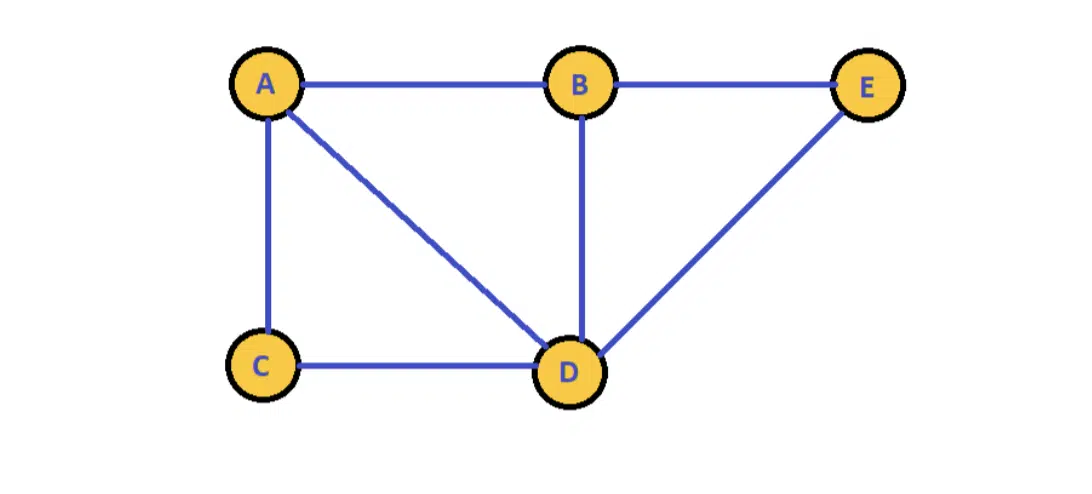
The graph above has five nodes. Node A connects to B, C, and D. Node B connects to A, D, and E. This is an undirected graph (no arrows). A directed graph adds arrows to specify which direction each edge can be traversed.
Building the Graph Data Structure
Step 1: Create the class
Python: create Graph.py and run it with python3 Graph.py.
class Graph:
    def __init__(self):
        print('init')
Java: create Graph.java, then compile and run:
javac Graph.java
java Graph
public class Graph
{
public static void main(String[] args) {
}
}Step 1 produces an empty output with no compilation errors.
Step 2: Declare data members
Add an integer for the node count and an adjacency list to hold each node’s edges.
Python
class Graph:
    N = 0
    nodes = []
    def __init__(self):
        print('init')
Java
import java.io.*;
import java.util.*;
public class Graph
{
    private int N;
    private ArrayList<ArrayList<Integer>> nodes;
    public static void main(String[] args) {
    }
}
Step 3: Initialize data members
The constructor creates N empty edge lists, one per node.
Python
class Graph:
    N = 0
    nodes = []
    def __init__(self, N):
        self.N = N
        self.nodes = []
        for u in range(N):
            self.nodes.append([])
Java
import java.io.*;
import java.util.*;
public class Graph
{
    private int N;
    private ArrayList<ArrayList<Integer>> nodes;
    public Graph(int n)
    {
        this.N = n;
        this.nodes = new ArrayList<ArrayList<Integer>>();
        for (int i = 0; i < this.N; ++i)
            this.nodes.add(new ArrayList<Integer>());
    }
    public static void main(String[] args) {
    }
}
Step 4: Add an edge method
addEdge(u, v) records a connection from node u to node v by appending v to u’s adjacency list.
Python
class Graph:
    N = 0
    nodes = []
    def __init__(self, N):
        self.N = N
        self.nodes = []
        for u in range(N):
            self.nodes.append([])
    def addEdge(self, u, v):
        self.nodes[u].append(v)
Java
import java.io.*;
import java.util.*;
public class Graph
{
    private int N;
    private ArrayList<ArrayList<Integer>> nodes;
    public Graph(int n)
    {
        this.N = n;
        this.nodes = new ArrayList<ArrayList<Integer>>();
        for (int i = 0; i < this.N; ++i)
            this.nodes.add(new ArrayList<Integer>());
    }
    public void addEdge(int u, int v)
    {
        this.nodes.get(u).add(v);
    }
    public static void main(String[] args) {
    }
}
Step 5: Instantiate the graph
Create a 5-node graph and wire up the edges shown in the diagram.
Python
class Graph:
    N = 0
    nodes = []
    def __init__(self, N):
        self.N = N
        self.nodes = []
        for u in range(N):
            self.nodes.append([])
    def addEdge(self, u, v):
        self.nodes[u].append(v)

graph = Graph(5)
graph.addEdge(0, 1) # A => B
graph.addEdge(0, 2) # A => C
graph.addEdge(0, 3) # A => D
graph.addEdge(1, 0) # B => A
graph.addEdge(1, 3) # B => D
graph.addEdge(1, 4) # B => E
graph.addEdge(2, 0) # C => A
graph.addEdge(2, 3) # C => D
graph.addEdge(3, 0) # D => A
graph.addEdge(3, 1) # D => B
graph.addEdge(3, 2) # D => C
graph.addEdge(3, 4) # D => E
graph.addEdge(4, 1) # E => B
graph.addEdge(4, 3) # E => D
Java
import java.io.*;
import java.util.*;
public class Graph
{
    private int N;
    private ArrayList<ArrayList<Integer>> nodes;
    public Graph(int n)
    {
        this.N = n;
        this.nodes = new ArrayList<ArrayList<Integer>>();
        for (int i = 0; i < this.N; ++i)
            this.nodes.add(new ArrayList<Integer>());
    }
    public void addEdge(int u, int v)
    {
        this.nodes.get(u).add(v);
    }
    public static void main(String[] args) {
        Graph graph = new Graph(5);
        graph.addEdge(0, 1); // A => B
        graph.addEdge(0, 2); // A => C
        graph.addEdge(0, 3); // A => D
        graph.addEdge(1, 0); // B => A
        graph.addEdge(1, 3); // B => D
        graph.addEdge(1, 4); // B => E
        graph.addEdge(2, 0); // C => A
        graph.addEdge(2, 3); // C => D
        graph.addEdge(3, 0); // D => A
        graph.addEdge(3, 1); // D => B
        graph.addEdge(3, 2); // D => C
        graph.addEdge(3, 4); // D => E
        graph.addEdge(4, 1); // E => B
        graph.addEdge(4, 3); // E => D
    }
}
Implementing DFS on the Graph
Step 1: Add a visited array
The DFS method tracks which nodes it has already processed. Add a visited boolean array as a data member.
Python
class Graph:
    N = 0
    nodes = []
    visited = []
    def __init__(self, N):
        self.N = N
        self.nodes = []
        self.visited = []
        for u in range(N):
            self.nodes.append([])
            self.visited.append(False)
    def addEdge(self, u, v):
        self.nodes[u].append(v)
Java
import java.io.*;
import java.util.*;
public class Graph
{
    private int N;
    private ArrayList<ArrayList<Integer>> nodes;
    private ArrayList<Boolean> visited;
    public Graph(int n)
    {
        this.N = n;
        this.nodes = new ArrayList<ArrayList<Integer>>();
        this.visited = new ArrayList<Boolean>();
        for (int i = 0; i < this.N; ++i)
        {
            this.nodes.add(new ArrayList<Integer>());
            this.visited.add(false);
        }
    }
    public void addEdge(int u, int v)
    {
        this.nodes.get(u).add(v);
    }
    public static void main(String[] args) {
        Graph graph = new Graph(5);
        graph.addEdge(0, 1); // A => B
        graph.addEdge(0, 2); // A => C
        graph.addEdge(0, 3); // A => D
        graph.addEdge(1, 0); // B => A
        graph.addEdge(1, 3); // B => D
        graph.addEdge(1, 4); // B => E
        graph.addEdge(2, 0); // C => A
        graph.addEdge(2, 3); // C => D
        graph.addEdge(3, 0); // D => A
        graph.addEdge(3, 1); // D => B
        graph.addEdge(3, 2); // D => C
        graph.addEdge(3, 4); // D => E
        graph.addEdge(4, 1); // E => B
        graph.addEdge(4, 3); // E => D
    }
}
Step 2: Write the DFS method
The DFS method takes a starting node (default 0). It returns immediately if the node is already visited. Otherwise it prints the node number, marks it visited, then recurses into each neighbor.
Python
class Graph:
    N = 0
    nodes = []
    visited = []
    def __init__(self, N):
        self.N = N
        self.nodes = []
        self.visited = []
        for u in range(N):
            self.nodes.append([])
            self.visited.append(False)
    def addEdge(self, u, v):
        self.nodes[u].append(v)
    def DFS(self, u=0):
        if self.visited[u]:
            return
        print(u)
        self.visited[u] = True
        for v in self.nodes[u]:
            self.DFS(v)

graph = Graph(5)
graph.addEdge(0, 1) # A => B
graph.addEdge(0, 2) # A => C
graph.addEdge(0, 3) # A => D
graph.addEdge(1, 0) # B => A
graph.addEdge(1, 3) # B => D
graph.addEdge(1, 4) # B => E
graph.addEdge(2, 0) # C => A
graph.addEdge(2, 3) # C => D
graph.addEdge(3, 0) # D => A
graph.addEdge(3, 1) # D => B
graph.addEdge(3, 2) # D => C
graph.addEdge(3, 4) # D => E
graph.addEdge(4, 1) # E => B
graph.addEdge(4, 3) # E => D
graph.DFS()
Java
Java does not support default parameter values. Instead, add a zero-argument overload that calls the parameterized version with 0 as the starting node.
import java.io.*;
import java.util.*;
public class Graph
{
    private int N;
    private ArrayList<ArrayList<Integer>> nodes;
    private ArrayList<Boolean> visited;
    public Graph(int n)
    {
        this.N = n;
        this.nodes = new ArrayList<ArrayList<Integer>>();
        this.visited = new ArrayList<Boolean>();
        for (int i = 0; i < this.N; ++i)
        {
            this.nodes.add(new ArrayList<Integer>());
            this.visited.add(false);
        }
    }
    public void addEdge(int u, int v)
    {
        this.nodes.get(u).add(v);
    }
    public void DFS(int u)
    {
        if (visited.get(u))
            return;
        visited.set(u, true);
        System.out.println(u);
        for (int i = 0; i < this.nodes.get(u).size(); ++i)
        {
            DFS(this.nodes.get(u).get(i));
        }
    }
    public void DFS()
    {
        DFS(0);
    }
    public static void main(String[] args) {
        Graph graph = new Graph(5);
        graph.addEdge(0, 1); // A => B
        graph.addEdge(0, 2); // A => C
        graph.addEdge(0, 3); // A => D
        graph.addEdge(1, 0); // B => A
        graph.addEdge(1, 3); // B => D
        graph.addEdge(1, 4); // B => E
        graph.addEdge(2, 0); // C => A
        graph.addEdge(2, 3); // C => D
        graph.addEdge(3, 0); // D => A
        graph.addEdge(3, 1); // D => B
        graph.addEdge(3, 2); // D => C
        graph.addEdge(3, 4); // D => E
        graph.addEdge(4, 1); // E => B
        graph.addEdge(4, 3); // E => D
        graph.DFS();
    }
}
DFS Output
0
1
3
2
4
Time Complexity
The time complexity of DFS equals the number of times its core statement executes. The core statement is marking a node visited and printing it. That statement runs exactly once per node, because the visited check prevents re-entry. For N nodes the total is O(N).
Time Complexity = O(N)
Breadth First Search
BFS visits every neighbor of the current node before going deeper. It uses a queue instead of recursion.
BFS path on the same graph:
A => B => C => D => EStarting at A, the algorithm visits B, C, and D (all of A’s neighbors) before visiting E (a neighbor of B and D that had not yet been reached).
BFS Implementation Step by Step
Step 1: Initialize the queue
Mark node 0 as visited, add it to the queue, and print it.
Python
def BFS(self):
    u = 0
    queue = []
    self.visited[u] = True
    queue.append(u)
    print(u)
Java
public void BFS()
{
    int u = 0;
    Queue<Integer> queue = new LinkedList<>();
    System.out.println(u);
    visited.set(u, true);
    queue.add(u);
}
Step 2: Process the queue
Loop until the queue is empty. On each iteration, pop the head of the queue as the current node.
Python
def BFS(self):
    u = 0
    queue = []
    self.visited[u] = True
    queue.append(u)
    print(u)
    while len(queue) > 0:
        u = queue.pop(0)
Java
public void BFS()
{
    int u = 0;
    Queue<Integer> queue = new LinkedList<>();
    System.out.println(u);
    visited.set(u, true);
    queue.add(u);
    while (queue.size() != 0)
    {
        u = queue.peek();
        queue.remove();
    }
}
Step 3: Enqueue unvisited neighbors
For each neighbor v of the current node, if v has not been visited, print it, mark it visited, and add it to the queue.
Python
def BFS(self):
    u = 0
    queue = []
    self.visited[u] = True
    queue.append(u)
    print(u)
    while len(queue) > 0:
        u = queue.pop(0)
        for v in self.nodes[u]:
            if not self.visited[v]:
                self.visited[v] = True
                queue.append(v)
                print(v)
Java
public void BFS()
{
    int u = 0;
    Queue<Integer> queue = new LinkedList<>();
    System.out.println(u);
    visited.set(u, true);
    queue.add(u);
    while (queue.size() != 0)
    {
        u = queue.peek();
        queue.remove();
        for (int i = 0; i < this.nodes.get(u).size(); ++i)
        {
            int v = this.nodes.get(u).get(i);
            if (!visited.get(v))
            {
                System.out.println(v);
                visited.set(v, true);
                queue.add(v);
            }
        }
    }
}
Complete BFS Implementation
Python
class Graph:
    N = 0
    nodes = []
    visited = []
    def __init__(self, N):
        self.N = N
        self.nodes = []
        self.visited = []
        for u in range(N):
            self.nodes.append([])
            self.visited.append(False)
    def addEdge(self, u, v):
        self.nodes[u].append(v)
    def BFS(self):
        u = 0
        queue = []
        self.visited[u] = True
        queue.append(u)
        print(u)
        while len(queue) > 0:
            u = queue.pop(0)
            for v in self.nodes[u]:
                if not self.visited[v]:
                    self.visited[v] = True
                    queue.append(v)
                    print(v)

graph = Graph(5)
graph.addEdge(0, 1) # A => B
graph.addEdge(0, 2) # A => C
graph.addEdge(0, 3) # A => D
graph.addEdge(1, 0) # B => A
graph.addEdge(1, 3) # B => D
graph.addEdge(1, 4) # B => E
graph.addEdge(2, 0) # C => A
graph.addEdge(2, 3) # C => D
graph.addEdge(3, 0) # D => A
graph.addEdge(3, 1) # D => B
graph.addEdge(3, 2) # D => C
graph.addEdge(3, 4) # D => E
graph.addEdge(4, 1) # E => B
graph.addEdge(4, 3) # E => D
graph.BFS()
Java
import java.io.*;
import java.util.*;
public class Graph
{
    private int N;
    private ArrayList<ArrayList<Integer>> nodes;
    private ArrayList<Boolean> visited;
    public Graph(int n)
    {
        this.N = n;
        this.nodes = new ArrayList<ArrayList<Integer>>();
        this.visited = new ArrayList<Boolean>();
        for (int i = 0; i < this.N; ++i)
        {
            this.nodes.add(new ArrayList<Integer>());
            this.visited.add(false);
        }
    }
    public void addEdge(int u, int v)
    {
        this.nodes.get(u).add(v);
    }
    public void BFS()
    {
        int u = 0;
        Queue<Integer> queue = new LinkedList<>();
        System.out.println(u);
        visited.set(u, true);
        queue.add(u);
        while (queue.size() != 0)
        {
            u = queue.peek();
            queue.remove();
            for (int i = 0; i < this.nodes.get(u).size(); ++i)
            {
                int v = this.nodes.get(u).get(i);
                if (!visited.get(v))
                {
                    System.out.println(v);
                    visited.set(v, true);
                    queue.add(v);
                }
            }
        }
    }
    public static void main(String[] args) {
        Graph graph = new Graph(5);
        graph.addEdge(0, 1); // A => B
        graph.addEdge(0, 2); // A => C
        graph.addEdge(0, 3); // A => D
        graph.addEdge(1, 0); // B => A
        graph.addEdge(1, 3); // B => D
        graph.addEdge(1, 4); // B => E
        graph.addEdge(2, 0); // C => A
        graph.addEdge(2, 3); // C => D
        graph.addEdge(3, 0); // D => A
        graph.addEdge(3, 1); // D => B
        graph.addEdge(3, 2); // D => C
        graph.addEdge(3, 4); // D => E
        graph.addEdge(4, 1); // E => B
        graph.addEdge(4, 3); // E => D
        graph.BFS();
    }
}
BFS Output
0
1
2
3
4
Time Complexity
BFS time complexity follows the same logic as DFS. Each node enters the queue once and is dequeued once. The core statement (print + mark visited + enqueue) runs exactly N times total.
Time Complexity = O(N)
Both DFS and BFS can be adapted to weighted graphs, directed graphs, and trees with minimal changes. The graph class built here is the starting point for shortest-path algorithms like Dijkstra and Bellman-Ford.
Need help with a data structures or algorithms assignment? See our Computer Science Homework Help page, or go directly to Java Assignment Help or Python Assignment Help.
Related posts: Sorting Algorithms in Java: Step-by-Step | Efficient Python Algorithms Explained
Related articles
-
 Java
JavaSpring Batch: A Practical Guide to Restartable Jobs
Learn Spring Batch 6 through a restartable CSV-to-database job covering jobs, steps, chunks, metadata, fault tolerance, parameters, testing, and scaling.
Sep 23, 2026
-
 Programming
Statistics for Data Science: Complete Guide with Examples
Learn the statistics behind data science with Python examples on distributions, sampling, confidence intervals, hypothesis tests, regression, and leakage.
Sep 23, 2026
-
 Case Study
Autograder Fixed in Under 24 Hours: 100/100
How our networking expert diagnosed a broken distance vector routing submission and delivered a 100/100 autograder score before the deadline.
Sep 2, 2025